
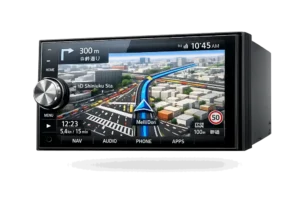
Japanese radios: silent screens, lost codes, sound that refuses to stay locked
Browse unlock guides
- SSL Secured
256-bit encrypted checkout
- 100% Guaranteed
Unlock works or your money back
- 1,000+ Unlocks
Trusted by JDM owners globally
- Fast Delivery
Instant codes & rapid shipping
Radio Code & Map SD Card Error Fix for Japanese Cars
Fast 3-Step Radio Recovery
Japanese car radio recovery is an automated 3-step process that calculates your genuine factory unlock code or configures a boot Map SD card to restore multimedia and navigation functions within 10 minutes.
Order Code or SD
Select your unlock or Map SD service and send your model number or screen photo to confirm compatibility.
Receive Your Solution
Codes are delivered fast via WhatsApp or email; Map SD orders are dispatched worldwide with tracking.
Unlock & Drive
Enter the code or insert the SD card to restore your radio or navigation system immediately.
Japanese Navigation Screen Error Messages
A Japanese navigation screen error is an anti-theft security prompt (such as a 16-digit ERC request or “Insert Correct Map SD Card” alert) triggered when 12V battery disconnection clears volatile memory. Match your screen below for instant unlock solutions:
- 01 地図カードを挿入してください。 Please insert map card. Fix Error
- 02 地図カードがありません。 Map card not found. Fix Error
- 03 ディスプレイを開き地図SDカードを入れてください Please open the display and insert the navigation SD card. Fix Error
- 04 地図ディスクを確認しています しばらくお待ち下さい Checking map SD card. Please wait. Fix Error
- 05 ファイルが見つかりません。SDカードをご確認ください。 File not found. Please check the SD card. Fix Error
- 06 地図SDHCメモリーカードをご確認ください Check map SDHC memory card. Fix Error
- 07 プログラム読み込みが必要です。パネルのオープンボタンを押してSDカードまたはプログラム更新メディアを入れてください Program loading required. Press open button and insert SD card / update media. Fix Error
- 08 ダイアグ検査メニュー Diagnostic inspection menu (system lock screen). Unlock Now
- 09 スイッチを『ピッ』と鳴るまで押してディスプレイを開き地図SDカードを入れて下さい Press switch until beep, open display, and insert map SD card. Fix Error
- 10 AVスイッチを押してディスプレイを開き地図SDカードを入れてください Press AV switch to open display and insert map SD card. Fix Error
- 11 暗証番号を入力してください Please enter password (security code lock). Unlock Now
"When entering your unlock code or inserting a boot SD card, keep ignition in ACC or ON for 60 to 90 seconds while firmware initializes."
Real Video Results For Japanese Radio Fixes
JapanRadios video tutorials provide verified visual proof demonstrating how to locate serial barcodes, calculate ERC passwords, and insert boot map SD cards across genuine Toyota, Honda, and Nissan head units.
Restored unit after a 12V battery disconnect.
Verified proof restoring a locked Toyota radio.
Plug-and-play fix for missing or invalid map SD errors.
"Always verify your 16-digit ERC or Gathers serial from the unit label before requesting your code to ensure first-time unlock accuracy."
Latest Unlock & Map SD Fixes
Our newest unlock solutions and Map SD cards are plug-and-play recovery packages specifically calibrated for newly imported and battery-reset Japanese multimedia systems.
Need help finding the right fix?
Send your model number, radio screen, or SD error photo and we’ll point you to the correct unlock, Map SD card, or supported recovery option.
Toyota Radio Unlock Codes
Fast unlock help for Toyota JDM radios requesting an ERC code after battery replacement.
- Battery-reset lock recovery.
- Remote-friendly diagnosis and delivery.
- Useful for common Toyota import radio issues.
Plug-and-Play Map SD Card Solutions
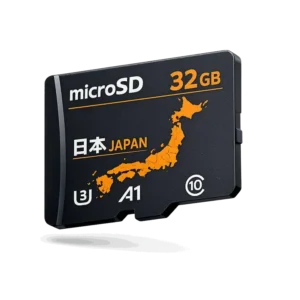
Fixes for systems showing “Insert Map SD Card” or similar missing-card errors, with support for restoring access to menus, navigation, and related functions on compatible units.
- Fixes missing or corrupted SD card errors.
- Restores access to menus, navigation, and related functions.
- Worldwide shipping for Japanese import owners.
Honda Gathers Unlock & SD Help
Support area for Honda imports with locked decks, missing SD cards, and battery-reset screens.
Open Honda Gathers KenwoodKenwood MDV & NMZK Recovery
Remote, permanent unlock help for Kenwood MDV, D, L, NMZK, and KXMG units.
Open Kenwood Solutions Trusted SupportExpert-Backed Help
Assistance for radio codes, missing SD cards, and model recovery across Nissan lines.
Browse Unlock Category Need Help?Get Model Check Support
Online help, model confirmation, and the right recovery path for JDM vehicle owners.
Contact SupportRadio Unlock Codes, Map SD Cards & More for JDM Vehicles
JapanRadios is a specialized navigation recovery service providing authentic unlock codes, plug-and-play boot Map SD cards, and Japanese-to-English language conversion for Toyota, Honda, Nissan, Kenwood, and other Japanese Domestic Market (JDM) multimedia systems.
- Radio Code Unlock
- Alpine Radio Code Unlock
- Carrozzeria Radio Code Unlock
- Clarion Radio Code Unlock
- Eclipse ESN Radio Code Unlock
- Honda Gathers Radio Code Unlock
- Kenwood Radio Code Unlock
- Panasonic Radio Code Unlock
- Pioneer Radio Code Unlock
- Toyota Radio Code Unlock
- Map SD Cards
- Alpine Map SD Card
- Carrozzeria Map SD Card
- Clarion Map SD Card
- Eclipse Map SD Card
- Honda Gathers Map SD Card
- Lexus Map SD Card
- Nissan Map SD Card
- Nissan MC Series Map SD Card
- Nissan MM Series Map SD Card
- Nissan MP Series Map SD Card
- Panasonic Map SD Card
- Pioneer Map SD Card
- Suzuki Map SD Card
- Toyota Map SD Card
- Volkswagen Map SD Card (JDM)
- Language Conversion
- Kenwood Language Conversion
- Mazda Language Conversion
- Mitsubishi Language Conversion
- Nissan Language Conversion
- Toyota Language Conversion
- Accessories & Kits
- Android Auto & Apple CarPlay Kits
- Dash Cameras for JDM Vehicles
- Reverse Cameras for JDM Vehicles
- Spare Parts
- USB Cables for JDM Car Systems
Most Popular Radio Unlock & Map SD Solutions
Our most requested JDM navigation services include instant online Toyota ERC unlock codes, Honda Gathers security PINs, and Nissan/Panasonic plug-and-play boot Map SD cards trusted by vehicle owners worldwide.
Toyota ERC Unlock Code
Instant 16-digit ERC calculator code for all Toyota/Lexus Japanese import units.
Map SD Boot Cards
Fix "Insert Map SD Card" error screen on NSZT, NSCN, MM, and Strada head units.
Honda Gathers Code
Unlock code for Gathers VXM, VRM, and VXU series in Fit, Vezel, Freed, Stepwgn.
Japanese Head Unit Compatibility & Unlock Matrix
| JDM Brand / Model | Solution Type | Required Input | Turnaround Time | Guarantee |
|---|---|---|---|---|
| Toyota / Lexus (NSZT, NSCN, ERC) | ERC Code Calculation | 16-Digit Screen Code | ⚡ 10 – 20 Mins | 100% Money Back |
| Honda Gathers (VXM, VXi Series) | Serial Code / Map SD | 8-Digit Serial / Barcode | ⚡ 10 – 20 Mins | 100% Verified |
| Nissan MM Series (MM313, MM315) | Map SD Boot Fix | Unit Serial / Model No. | 🚚 Express Dispatch | Plug & Play |
| Kenwood MDV / NMZK / Eclipse | Passcode Recovery | Lock Screen Photo | ⚡ 15 – 30 Mins | 100% Guaranteed |
| Panasonic Strada (CN Series) | SD Card Solution | Unit Model Number | 🚚 Express Dispatch | Factory Tested |
Proven Results Across Major Japanese Brands
Supported Japanese vehicle brands include Toyota, Lexus, Honda, Nissan, Subaru, Mazda, Suzuki, and Mitsubishi, compatible with Strada, Gathers, Carrozzeria, Clarion, Kenwood, and Eclipse units.
Answers For Radio Unlocks, Map SD Fixes & More
Frequently asked questions provide direct answers on radio code calculations, Map SD installations, turnaround times, and guarantees.
What Japanese radio unlock services do you provide?
We provide factory radio unlock codes for Toyota ERC, Honda Gathers, Nissan, Alpine, Carrozzeria, Clarion, Eclipse, Kenwood, Panasonic, and Pioneer systems locked after battery resets.
Which “Insert Map SD Card” and navigation SD card problems do you fix?
We supply plug-and-play boot Map SD cards for Toyota/Lexus (NSZT, NSCP), Nissan (MM, MC, MP), Honda Gathers, Panasonic Strada, Clarion, Eclipse, and Suzuki head units.
Do you support Japanese to English language conversion?
Yes. We offer Japanese-to-English firmware conversion for Kenwood, Mazda, Mitsubishi, Nissan, and Toyota systems to provide English menus, settings, and controls.
Do I need to replace the whole radio if it is locked or showing an SD error?
No. Most Japanese radio lockouts and SD errors are security prompts resolved with the correct factory code or boot card, avoiding costly unit replacement.
What should I send before you check compatibility?
Send a photo of your locked screen, model number, or 16-digit ERC barcode via WhatsApp. We confirm exact compatibility before ordering.
Which accessories and spare parts do you also offer for JDM systems?
We supply Android Auto and Apple CarPlay kits, OEM reverse cameras, dash cams, and USB cables designed for Japanese vehicle systems.
Can you help if my radio locked after a battery change or power reset?
Yes. Battery disconnection is the main cause of lockouts. We calculate your PIN or supply the boot SD card to restore operation immediately.
Can Bluetooth, FM, USB, DVD, or navigation return after the fix?
Yes. The correct code or boot SD card restores all factory features, including Bluetooth, FM radio, reverse camera, USB audio, and controls.
Is the solution digital, remote, or physically shipped?
Unlock codes and ERC passwords are sent online within 10 minutes. Boot SD cards and hardware kits are dispatched worldwide.
Can I order from outside my country if I imported a Japanese vehicle?
Yes. We serve JDM owners globally across the UK, New Zealand, Australia, Ireland, the Caribbean, Africa, and North America with 24/7 support.
What if I do not know whether I need a radio code, a Map SD card, or language conversion?
Send a photo of your locked screen or model number to JapanRadios via WhatsApp. Our technicians will identify the correct solution immediately.
Ready to Unlock Your Navigation?
Instant navigation unlocking is available 24/7 by sending a photo of your locked screen or radio model number directly to JapanRadios via WhatsApp or website checkout.